

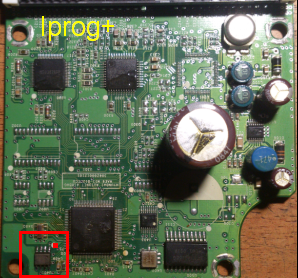
The Chery M11’s airbag system is managed by the Supplemental Restraint System (SRS) control module, which stores crash data in an EEPROM (Electrically Erasable Programmable Read-Only Memory) chip. After an airbag deployment, this crash data needs to be cleared to restore the airbag system to proper functionality.
Locating the SRS Module:
In the Chery M11, the SRS control module is typically located beneath the center console between the front seats or under the dashboard near the center. It is usually encased in a metal housing and connected with distinctive yellow wiring harnesses, indicating airbag system components.
Accessing and Resetting the EEPROM Chip:
- Safety Precautions: Before beginning any work on the airbag system, disconnect the vehicle’s battery and wait at least 3 minutes to prevent accidental airbag deployment.
- Remove the SRS Module: Carefully remove the necessary interior panels to access and extract the SRS module from its location.
- Open the Module Casing: Once removed, open the metal casing of the SRS module to expose the internal circuit board.
- Identify the EEPROM Chip: Look for a small 8-pin surface-mounted chip on the circuit board; this is the EEPROM chip that stores crash data.
- Reset the Chip: Resetting the crash data involves reprogramming or replacing the EEPROM chip, a process that requires specialized equipment and expertise. If you’re not experienced with electronic repairs, it’s advisable to seek professional assistance to ensure the airbag system functions correctly after the reset. Services like Safety Restore offer airbag module reset services, erasing all crash data and hard codes to restore the module to its factory condition.
For a visual guide on resetting the SRS airbag module, you may find the following video helpful






Customer Reviews
Thanks for submitting your comment!